How to Convert Outlook PST File? - Get the Solution!
The best way to know how to convert Outlook PST file to non-PST file is to use Outlook Magic tool screen shots. Outlook magic gives simple explanatory steps to show how to convert Outlook PST file to other formats. Here are the following steps that clarifies about how to convert Outlook PST file.

Follow Steps in Screenshots - Know How to Convert Outlook PST file
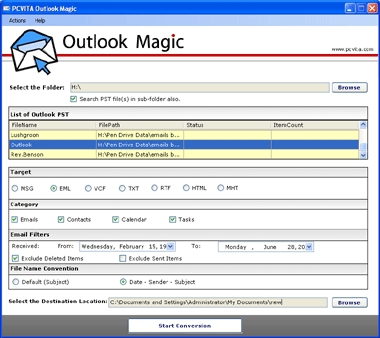
- Open Outlook Magic Tool, Start » Programs » Outlook Magic. Search PST file, Click browse button >> Click search PST file in sub folder button.
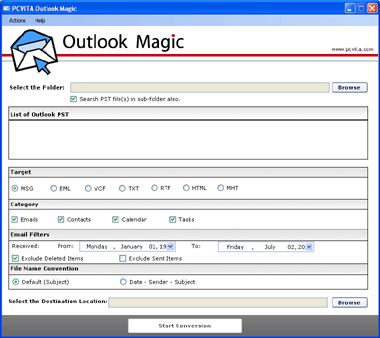
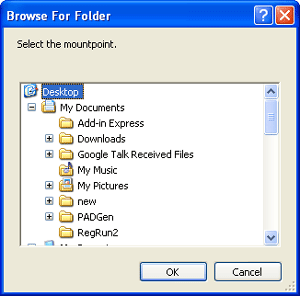
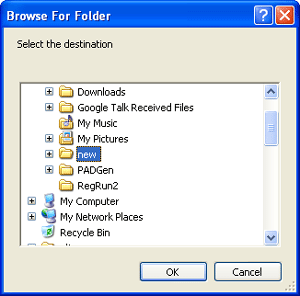
- Select PST file from the folder hierarchy. Click OK
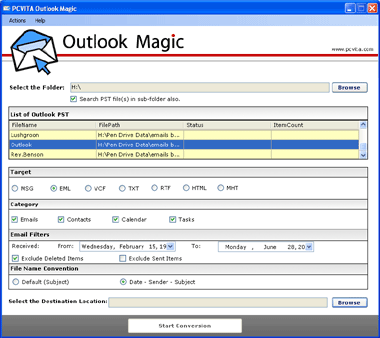
- A detailed list of multiple PST file are shown to user that are being browsed.
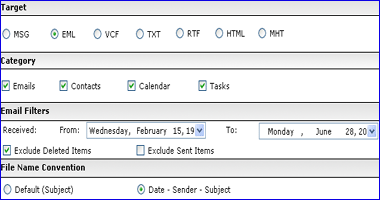
- Select target (MSG, EML, VCF, TXT, RTF, HTML, MHT) >> Select Category (Emails, Contacts, Calendar, Tasks) >> Set Email Filters >> Set File Name Conventions
- Select destination location where you want to save the file, Click OK
- Click Start Conversion process to convert PST file to non-PST file format.
 MS Outlook 2010, 2007, 2003 any version must be installed.
 MS Outlook should be set as default email client.
 Outlook should be properly configured with POP3.
 Outlook profile should not be connected with Exchange Server.
 Source folder must contain only PST files (while browsing).

Other Tools for Outlook Management


FREE Demo version convert Outlook PST file with first 15 items to Non-PST format. To convet Outlook PST file in unlimited way, buy Full version PCVITA Outlook Magic tool only at $49.